Why measure AI return on investment (ROI)
Measuring AI ROI has always been confusing. Vendors promise miracles, business surveys contradict each other, and your project is rarely like the ones in the case studies.
In KPMG’s latest AI survey of large companies ( Global AI Pulse Q3 2026 ), 89% of leaders said they get measurable value from AI, but only 12% consistently compare that value with what it cost.
Plenty of companies believe AI pays off, and far fewer have actually measured it.
You can do that sum before you spend anything, and you don’t need a finance team to do it.
By the end of this article you’ll have a five-step method that works for almost any AI use case, and it gives you one clear number: how much work the AI has to handle each month to pay for itself in year one. That number is called the break-even point.
With this method you can see straight away whether the AI project makes sense.
Don’t be scared by the numbers; I provided an easy-to-use template that handles all calculations. The link is at the end of the article.
What I actually did
I’ve calculated AI ROI a few different ways, including with a small app I built a few years back to size up potential AI projects with clients. The maths was always the easy part. The hard part was knowing whether the inputs were any good.
I spent a lot of time playing with numbers and looking for the best way to measure the feasibility of any AI initiative.
The best I’ve found has an ugly name: time-driven activity-based costing, or TDABC. Robert Kaplan and Steven Anderson published it in Harvard Business Review in 2004 ( Time-Driven Activity-Based Costing ). The idea is simple: calculate what a minute of someone’s time costs, and how many minutes the work takes. I came across it in a paper that used it to test AI in hospital stroke care, which shows how far the idea travels.
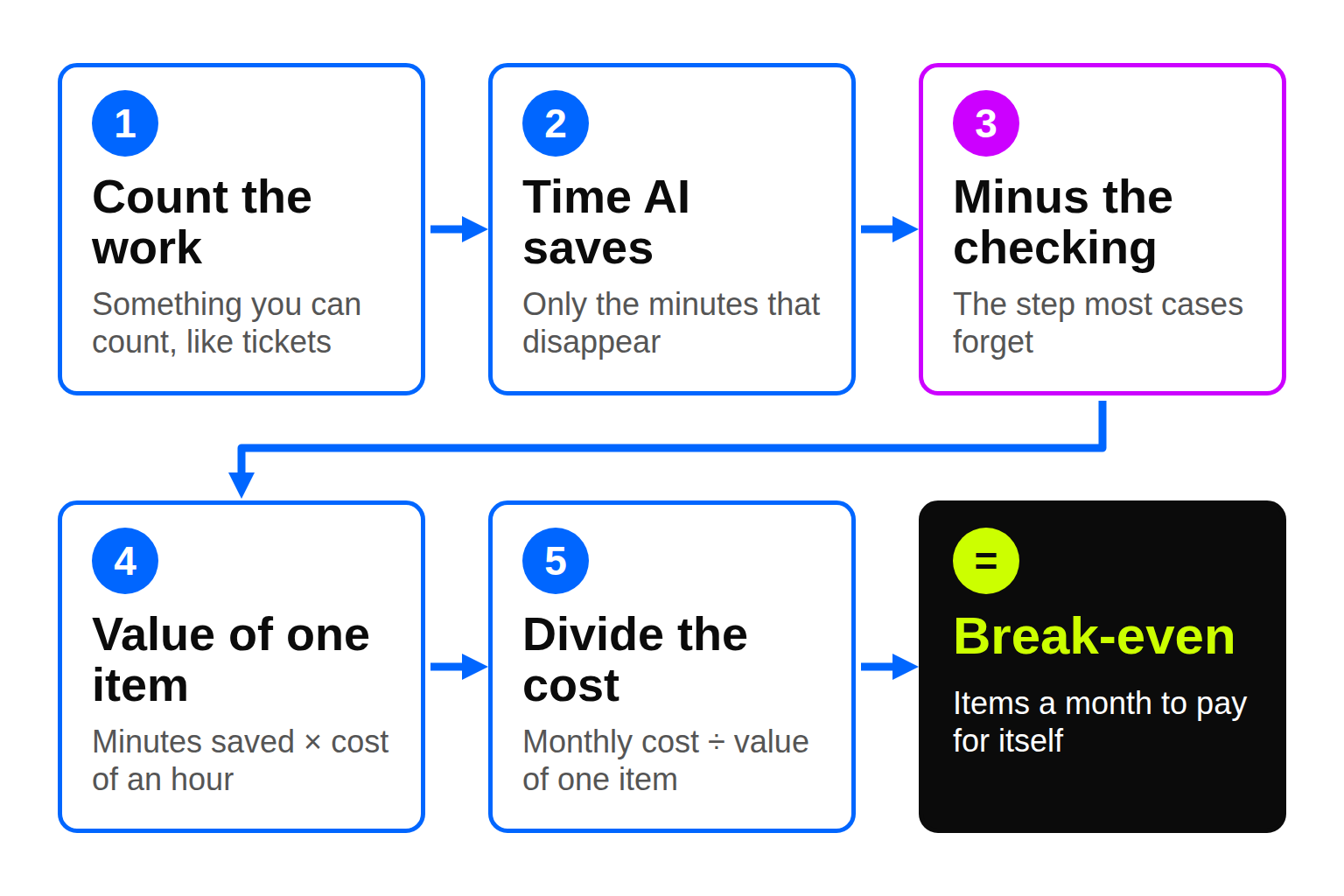
Here’s how I turned it into a process for any use case:
- Pick something you can count. That might be a support ticket, invoice, proposal, contract, report, or one employee using a tool for a month. If you can’t count it, you can’t price it yet, and that’s worth knowing before you buy anything.
- Work out the time AI really saves on one item. Only count minutes that disappear. If someone still has to open the file, those minutes stay.
- Take off the checking time. Someone has to review what AI produces, so those minutes aren’t saved. This is the step most business cases forget.
- Put a currency value on one item. Multiply the minutes saved by the person’s full hourly cost, including employer costs and overhead. If AI also brings fewer errors or extra sales, add that as a separate line, so you can see how much of the case depends on it.
- Work out the monthly break-even. Add up the year-one cost (build, licences and usage fees), divide by 12, then divide by the value of one item.
Here’s the process on three very different use cases: support tickets, supplier invoices and sales proposals. The numbers are made up, so swap in your own. Each row has a letter, so you can see how it’s calculated:
| Row | How it’s worked out | Support tickets | Supplier invoices | Sales proposals |
|---|---|---|---|---|
| A. Items a month | Your count | 2,000 | 1,000 | 15 |
| B. Minutes AI saves per item | Your estimate | 5 | 5 | 120 |
| C. Minutes to check AI output | Your estimate | 1 | 1 | 30 |
| D. Cost of one hour | Your figure | €30 | €35 | €60 |
| E. Other value per item | Your estimate | None | None | €50 (extra wins) |
| F. Minutes really saved | B − C | 4 | 4 | 90 |
| G. Value of one item | F × D ÷ 60 + E | €2.00 | €2.33 | €140 |
| H. Year-one cost | Build + licences + usage | €25,800 | €14,400 | €18,000 |
| I. Break-even a month | H ÷ 12 ÷ G | 1,075 | 515 | 11 |
| J. Room to spare | A ÷ I | 1.9× | 1.9× | 1.4× |
| K. Year-one gain | A × G × 12 − H | +€22,200 | +€13,600 | +€7,200 |
Take tickets. The AI saves 4 real minutes per ticket, and a minute costs €0.50, so each ticket is worth €2. The project costs €25,800 in year one: €15,000 to build, plus €900 a month for licenses and usage. That’s €2,150 a month (€25,800 ÷ 12), so it needs 1,075 tickets a month to pay for itself. You handle 2,000.
One catch: if the vendor charges per ticket instead of a flat fee, your cost grows with volume. Take that fee off the value of each ticket before you divide. At €0.20 a ticket, each one is worth €1.80, not €2.
Row J is the one to look at. It divides what you handle by what you need. Anything above 1× pays back in year one. The higher it is, the more your guesses can be wrong before the project loses money.
Tickets and invoices both sit at 1.9×, so they have plenty of room. Proposals sit at 1.4×, and only because of the €50 extra wins in row E. Take those out and each proposal is worth €90; the break-even goes up to 17, and you only write 15 proposals. So the extra wins are the first thing to test.
What if checking takes longer than you think
Row C (the minutes to check) is the guess I trust least. Vendors rarely tell you how long checking takes, so let’s test it.
Say half of the time the AI saves goes to checking. For tickets, that means 2.5 of the 5 minutes, instead of the 1 minute we assumed. Everything else stays the same:
| Half the saved time goes to checking | Support tickets | Supplier invoices | Sales proposals |
|---|---|---|---|
| C. Minutes to check (was) | 2.5 (1) | 2.5 (1) | 60 (30) |
| G. Value of one item (was) | €1.25 (€2.00) | €1.46 (€2.33) | €110 (€140) |
| I. Break-even a month (was) | 1,720 (1,075) | 823 (515) | 14 (11) |
| K. Year-one gain (was) | +€4,200 (+€22,200) | +€3,100 (+€13,600) | +€1,800 (+€7,200) |
| Share of the gain that’s gone | 81% | 77% | 75% |
The last row is the gain you lost divided by the gain you had. For tickets, the gain drops from €22,200 to €4,200, so you lose €18,000. €18,000 ÷ €22,200 = 81%.
One number changed and three quarters of the gain went with it. All three projects still pay for themselves, but only just. That’s why I’d never trust a business case built on one guess of the checking time.
How much can you trust the answer
The checking test changes one number. In real life all of them move at once: volume dips, the hourly cost is a bit off, the build runs over. A Monte Carlo simulation tests all of that together. The name comes from the gambling industry, but the idea is simple.
Instead of one guess for each number, you give three: a low, a likely and a high. For proposals, I said the AI saves between 90 and 150 minutes, most likely 120, and the extra wins are worth between €0 and €80, most likely €50.
The computer then plays out the year 2,000 times. Each time it picks a value for every number, somewhere between your low and high, usually near the likely one. Then it adds up the result. You end up with 2,000 possible years, and you can count how many of them made money.
Here’s what came out for the three examples:
| Year-one result | Support tickets | Supplier invoices | Sales proposals |
|---|---|---|---|
| Simple sum (row K above) | +€22,200 | +€13,600 | +€7,200 |
| Typical year (half the runs did better, half worse) | +€18,600 | +€11,400 | +€4,400 |
| A bad year (only 1 run in 10 was worse) | +€9,900 | +€6,400 | −€1,100 |
| Chance of losing money | Under 1% | Under 1% | About 15% |
| Cautious payback (9 runs in 10 paid back faster) | 9 months | 9 months | 13 months |
The typical year is lower than the simple sum because I set the ranges the way projects usually go: more room for things to go worse than better. Checking can easily take twice as long as planned, but it never takes no time at all.
This is the table I’d take into the meeting. The simple sum says all three projects work. The simulation says two are solid and the third is a real bet.
My own rule is that the cautious payback should be 12 months or less, so proposals would fail until I’d tested those extra wins. Your rule can be different, but pick it before you see the results.
You don’t need this for every small decision. It’s worth doing when the project is big or the break-even is close to your real volume.
Use your own numbers with the provided template
I’ve put everything in this article into one spreadsheet: the five steps, the checking test and the simulation, with all three examples filled in.
Type your own numbers into the yellow cells and the rest works itself out. It runs in plain Excel or Google Sheets, with no add-ins.
Each time you press F9, the simulation runs again and the results move a little. That’s normal.
The spreadsheet is in the free subscriber library, along with the tools and templates from other issues. Join the newsletter and you’ll get the link straight away.
So what
Saved time isn’t saved money. The invoice example frees up about 67 hours a month. That’s about 0.4 of a person, and you can’t let 0.4 of a person go. That time becomes a hire you didn’t need to make, overtime you stopped paying, or more work done by the same team. Decide which before you approve the project, or the savings stay on paper.
Missing the year-one target doesn’t automatically kill a project. The build is a one-off, so year two is much cheaper. You can still go ahead, as long as everyone knows they’re signing up for a longer payback.
Finally, decide now when you’d stop. Gartner found that only 17% of CIOs have guidelines for ending low-value AI projects that are already live ( Gartner CIO Survey ). Your break-even gives you that rule for free: if the volume falls below this line, or the checking climbs above that one, you switch it off.
One thing to try
Pick one repeated task in your team this week and count how many times it happens a month, how many minutes it takes, and what an hour of that person’s time costs.
Put them in the “Your case” column of the spreadsheet, then run the checking test twice, once with 20% of the saved time going to checking and once with 50%. Then ask your vendor, who promises miracles, how many minutes the tool really removes, and how many come back for review.
Forward this to whoever signs off on AI spend, with your break-even number in the note.